2AM, the checkout service is down, and the pod is Running. The Service is Active. Endpoints look populated. I kubectl exec into a debug pod and run wget http://checkout:8081 and get back Connection refused in under a second. Not timeout. Refused. My brain immediately runs to NetworkPolicies, kube-proxy, CNI, iptables. I spend thirty minutes reading iptables rules on a node. The rules are fine. I finally open the Service YAML one more time, and the targetPort is 8080, but the container is listening on a different port. One number. Half an hour gone. This post is me handing you those thirty minutes back.
The scenario
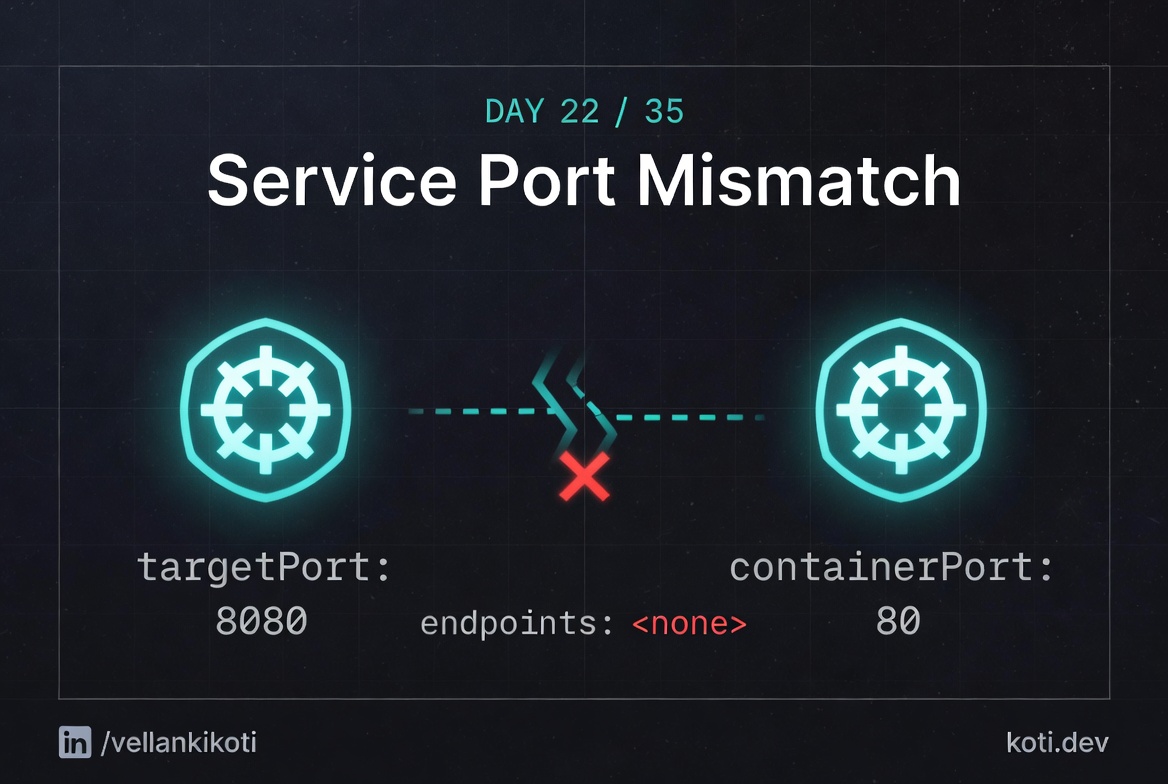
The Service says targetPort 8080. The pod listens on 8081.
The port chain is Service.port → Service.targetPort → containerPort. All three must match end-to-end. kube-proxy rewrites traffic to the targetPort, not the containerPort. The pod's containerPort field is informational only — the kernel does not enforce it. One digit off, and every connection gets a RST.
Service.targetPort is the source of truth
The Service spec says targetPort: 8080. This value drives the Endpoints object — run kubectl get endpoints web-svc -o yaml and you will see the pod IP listed with port 8080, regardless of what the pod actually listens on.
kube-proxy DNATs to the targetPort
kube-proxy installs iptables DNAT rules that rewrite the destination of any packet sent to the Service ClusterIP on port 80 to pod-ip:8080. It reads targetPort, not containerPort.
The pod listens on 8081, not 8080
The container process bound to :8081. The kernel has no socket on :8080, so it replies with TCP RST. Note that containerPort in the pod spec is purely informational — the kubelet does not enforce it, so the mismatch goes undetected until runtime.
Before we debug theory, let's reproduce the exact thing in your own cluster so the output on your screen matches the output in this post.
git clone https://github.com/vellankikoti/troubleshoot-kubernetes-like-a-pro.git
cd troubleshoot-kubernetes-like-a-pro/scenarios/service-port-mismatch
lsYou should see issue.yaml, fix.yaml, description.md, and mismatch_config.sh. The two YAML files are all we need. One breaks the service, one fixes it.
Reproduce the issue
kubectl apply -f issue.yamlservice/service-port-issue created
pod/service-port-issue-pod createdNow pretend you are a client trying to reach this service:
kubectl run tester --rm -it --image=busybox --restart=Never -- \
wget -qO- --timeout=3 http://service-port-issue:8081wget: can't connect to remote host (10.96.42.17): Connection refusedThe Service exists. The pod is Running. The wget fails instantly with Connection refused. That word refused is a clue, not an error. It means something answered at the IP, but nothing is listening on that port. Remember that, it matters later.
Debug the hard way
First, look at the pod and the service side by side:
kubectl get pod service-port-issue-pod -o wideNAME READY STATUS RESTARTS AGE IP NODE
service-port-issue-pod 1/1 Running 0 42s 10.244.1.5 worker-1kubectl get svc service-port-issueNAME TYPE CLUSTER-IP EXTERNAL-IP PORT(S) AGE
service-port-issue ClusterIP 10.96.42.17 <none> 8081/TCP 42sNow the one command that solves this problem 90% of the time:
kubectl get endpoints service-port-issueNAME ENDPOINTS AGE
service-port-issue 10.244.1.5:8080 55sRead that carefully. The Service is listening on port 8081. The endpoint for that service is 10.244.1.5:8080. So when kube-proxy DNATs your request, it sends 8081 traffic to 8080 on the pod. The container in this scenario is listening on 8080, so kube-proxy actually does the right thing, but the symptom you see depends on what your container listens on versus what targetPort says. In the broken case in the wild, this is where the numbers diverge.
Why this happens
A Kubernetes Service has three port concepts and people mix them up constantly. port is the port the Service exposes inside the cluster, so other pods talk to it. targetPort is the port on the pod where traffic is forwarded, it must match whatever the container actually listens on. containerPort on the pod spec is documentation, it does not open or bind anything, it's a hint for tooling and for humans reading the YAML.
The trap is targetPort. If the container listens on 8080 but targetPort is 80, the Service happily creates endpoints and kube-proxy happily forwards traffic, and every client gets Connection refused because nothing is actually listening on the target port inside the pod. No event, no warning, no error log. Just silence dressed up as a healthy service.
The other trap is named ports. You can write targetPort: http and Kubernetes will look up a port named http in the pod's containerPort list. Rename the port in the Deployment and forget to rename it in the Service, and you get the same refused connection with nothing in any log telling you why.
The fix
kubectl delete -f issue.yaml
kubectl apply -f fix.yamlThe diff is one line. The Service port and targetPort both become 8080, matching the container:
ports:
  - protocol: TCP
    port: 8080
targetPort: 8080Verify:
kubectl get endpoints service-port-fixed
kubectl run tester --rm -it --image=busybox --restart=Never -- \
wget -qO- --timeout=3 http://service-port-fixed:8080The endpoint list now shows 10.244.1.x:8080 and the wget returns actual content instead of refused.
The lesson
Connection refusedis your friend. It means routing works but nothing is listening. Look attargetPortfirst, not at NetworkPolicies.kubectl get endpointsis the single most under-used command in Kubernetes debugging. If endpoints exist but clients fail, it is almost always port or protocol.- Named ports are great until somebody renames them in one place and not the other. Prefer numeric
targetPorton small services and keep names consistent on big ones.
Day 22 of 35, tomorrow a container wants a host port another container already claimed, and the new pod sits in Pending looking innocent.