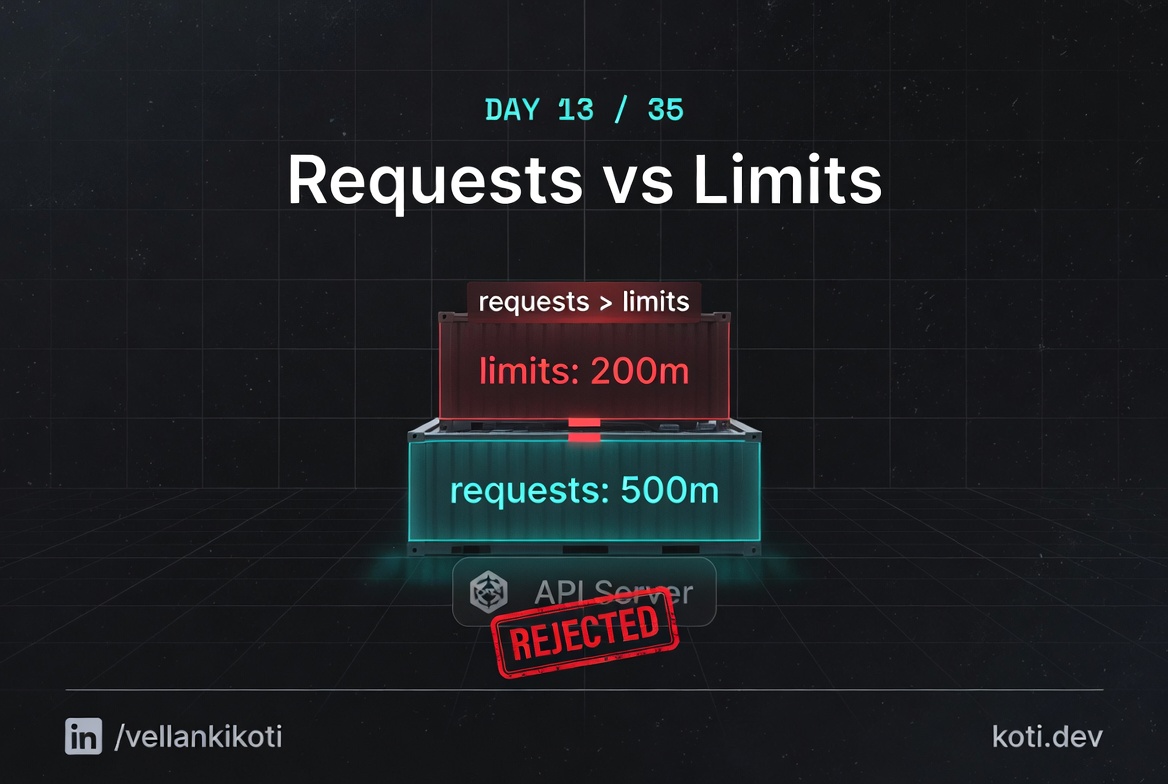
2:33 AM. This one is not actually an incident, it is a CI job screaming. A developer pushed a change to a Helm chart and the deploy pipeline has gone red on the kubectl apply step. The error message, if you squint at the pipeline logs, is short and angry. I have seen it enough times to know what it is before I even scroll. Limit less than request. The API server refused the pod at submission time, which is actually the friendliest failure mode Kubernetes has, because the cluster state never gets dirty. The bad manifest never becomes a live object.
Most of the complaints I get about Kubernetes error messages are fair. This one, honestly, is not. This one the API server gets right.
The scenario
The pod was scheduled fine. It was throttled at runtime.
The pod requests 100m CPU — so the scheduler places it on a node with 100m of headroom. The limit is set at 2000m. At runtime the pod tries to use 1500m but the node is saturated. The CFS bandwidth controller throttles 87% of every scheduling period. Requests decide placement; limits decide runtime behaviour. The gap between them is where surprises live.
Requests and limits are enforced at different layers — this is the key insight
requests.cpu: 100m is a scheduling hint — the scheduler finds a node with at least 100m unallocated and binds the pod there. limits.cpu: 2000m is a runtime cap enforced by the kubelet via Linux cgroups. A 20× gap between them means the pod can be placed on a nearly-full node and then immediately fight for CPU it was never guaranteed.
The scheduler did its job — placement was correct given what it knew
node-1 had exactly 100m of unallocated CPU — matching the request. The scheduler has no visibility into actual runtime usage. It only tracks the sum of requests across all pods. Check node pressure with kubectl top nodes and pod CPU with kubectl top pods to see real consumption.
CFS throttling is silent — no OOMKill, no crash, just slow
The Linux CFS bandwidth controller gives the pod a CPU quota per period (usually 100ms). Once that quota is exhausted, the pod is forcibly put to sleep for the rest of the period regardless of whether other cores are idle. The fix is either to raise requests.cpu to reflect real usage — so the pod lands on a node that can actually serve it — or to reduce the gap between requests and limits. Check throttle rate with kubectl exec -it <pod> -- cat /sys/fs/cgroup/cpu/cpu.stat.
git clone https://github.com/vellankikoti/troubleshoot-kubernetes-like-a-pro.git
cd troubleshoot-kubernetes-like-a-pro/scenarios/resource-requests-limits-mismatch
lsdescription.md, issue.yaml, fix.yaml, resource_mismatch.sh. The issue manifest sets CPU request to 500 millicores and CPU limit to 100 millicores. That is not a typo, that is the whole point of the scenario.
Reproduce the issue
kubectl apply -f issue.yamlThe Pod "resource-mismatch-pod" is invalid:
spec.containers[0].resources.requests: Invalid value: "500m":
must be less than or equal to cpu limitUnlike everything else in this series so far, there is no Pending pod to stare at. No describe to read. No events to parse. The API server rejected the manifest and nothing was created.
kubectl get pod resource-mismatch-podError from server (NotFound): pods "resource-mismatch-pod" not foundConfirm it does not exist. That is the signature of a validation failure: no object, not even a bad one.
Debug the hard way
The "debug" here is literally reading the error message out loud. spec.containers[0].resources.requests is the offending path, 500m is the offending value, and the rule is must be less than or equal to cpu limit. Three pieces of information in one line. Look at the manifest:
grep -A 6 resources issue.yamlresources:
requests:
memory: "200Mi"
cpu: "500m"
limits:
memory: "500Mi"
cpu: "100m"Request 500m, limit 100m. The request is the floor the scheduler guarantees, the limit is the ceiling the kubelet enforces. A floor above a ceiling is nonsense. The API server runs this check during admission and refuses.
If you want to see the rule in the API docs, the field is documented on the ResourceRequirements type. The admission controller that enforces it is called LimitRanger when a LimitRange is in play, but even without one, the core API server still runs the floor-below-ceiling check for you.
Why this happens
Requests and limits are two different things and most people conflate them. The request is what the scheduler uses to decide where a pod fits. It is a reservation. The kubelet uses it to set the cgroup's cpu.shares and the container's memory guarantee. The limit is the cap that the kernel enforces. For CPU it is a throttle, for memory it is a hard ceiling that, when crossed, gets you OOMKilled. Tomorrow's post is about that exact death.
When the limit is smaller than the request, the scheduler and the kernel would be operating on contradictory instructions. You would be telling the scheduler "reserve 500 millicores for me" and telling the kernel "never give me more than 100 millicores." The scheduler would find a node with 500m free, place the pod, and then the kernel would immediately throttle it down to 100. Kubernetes refuses to let you set up that trap.
The reason it is a friendly failure is that the rejection happens at kubectl apply, before any scheduling, before any image pull, before any pod ever exists. Your CI pipeline dies cleanly. There is no half-running workload to clean up.
The fix
kubectl apply -f fix.yaml
kubectl get pod resource-mismatch-fixed-podNAME READY STATUS RESTARTS AGE
resource-mismatch-fixed-pod 1/1 Running 0 4sThe diff that matters:
resources:
  requests:
    cpu: "500m"
  limits:
cpu: "500m" # was "100m"Setting request and limit to the same value is the Guaranteed QoS class, which is the right default for most serious workloads. If you want burstable behaviour, set the limit higher than the request, never lower.
The lesson
- When
kubectl applyfails and no object is created, read the error message literally. It is almost always a validation rule and it will tell you the field. - Requests are a floor, limits are a ceiling. The floor can never be above the ceiling.
- Setting request equal to limit gives you the Guaranteed QoS class, which is the safest default for serious workloads.
Day 13 of 35 — tomorrow, the Linux kernel kills a container in cold blood, and we read the OOM score to find out why.