Friday evening, 9:40 PM. The release pipeline finished, the deployment updated, every new pod is in ErrImagePull. I assume it is a typo because it is always a typo. I diff the deployment against the previous revision. No typo. I check the registry in a browser. The tag is there. I waste ten minutes on pull secrets before I finally read the actual Failed event and see no such host. It is not auth. It is not a typo. The registry's DNS record rotated an hour ago and our node pool still has the old one cached. Three different causes, one status column, and I just burned ten minutes on the wrong hypothesis because I trusted the error name instead of the error message.
The scenario
The image name is right. The credentials are missing.
kubelet asks containerd to pull the image. containerd contacts the private registry. The registry returns HTTP 401 because no Authorization header was sent — there is no imagePullSecret wired to this pod.
The pod references a private image
The spec sets image: private.registry.example/api:1.4 but has no imagePullSecrets field. The image name is valid — the credentials are simply absent.
The registry returns 401 Unauthorized
The OCI distribution spec requires a GET /v2/{name}/manifests/{ref} call to authenticate. Without an Authorization header the registry rejects the request immediately.
kubelet marks the pod ErrImagePull
After the 401, the kubelet image manager records the failure and sets reason: ErrImagePull on the pod status. Fix: create a Secret and reference it in spec.imagePullSecrets.
From my troubleshoot-kubernetes-like-a-pro repo. Reproduce the failure on your own cluster and practice reading the event line that actually matters.
git clone https://github.com/vellankikoti/troubleshoot-kubernetes-like-a-pro.git
cd troubleshoot-kubernetes-like-a-pro/scenarios/image-pull-error
lsdescription.md, issue.yaml, fix.yaml. Assumes you have a cluster running from Day 0.
Reproduce the issue
kubectl apply -f issue.yaml
kubectl get podsNAME READY STATUS RESTARTS AGE
image-pull-error-pod 0/1 ErrImagePull 0 18sErrImagePull, zero restarts, because this is not a restart loop. The container has never existed.

Debug the hard way
Logs are always the first instinct.
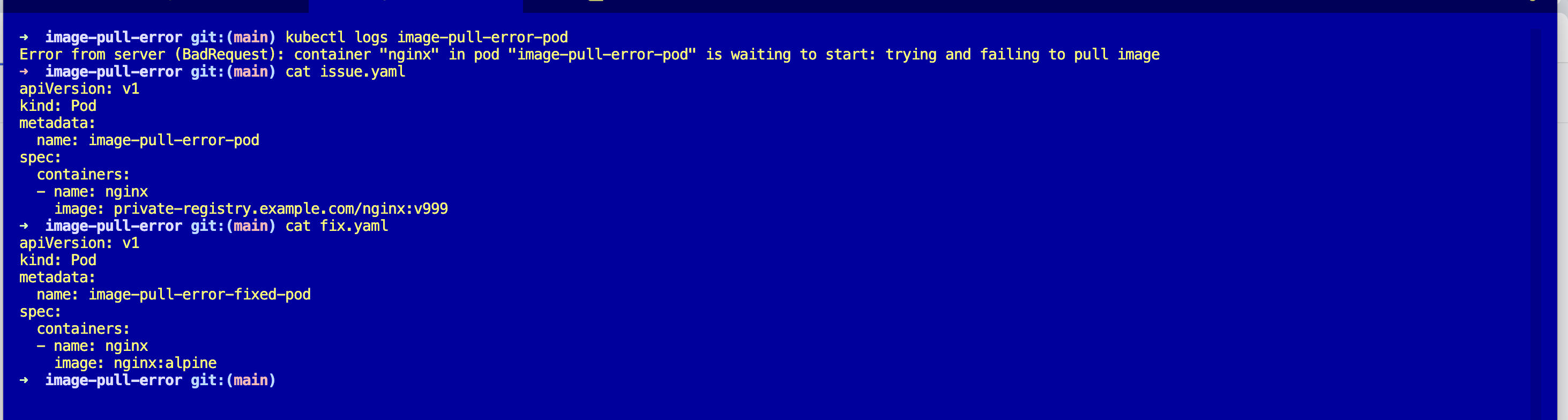
kubectl logs image-pull-error-podError from server (BadRequest): container "nginx" in pod "image-pull-error-pod"
is waiting to start: trying and failing to pull image"Trying and failing." Thanks.
Describe.
kubectl describe pod image-pull-error-podEvents:
Type Reason Age From Message
---- ------ ---- ---- -------
Normal Pulling 15s (x2 over 30s) kubelet Pulling image
"private-registry.example.com/nginx:v999"
Warning Failed 14s (x2 over 29s) kubelet Failed to pull image
"private-registry.example.com/nginx:v999":
rpc error: code = Unknown desc =
failed to resolve reference: failed to do request:
Head "https://private-registry.example.com/v2/nginx/manifests/v999":
dial tcp: lookup private-registry.example.com:
no such host
Warning Failed 14s (x2 over 29s) kubelet Error: ErrImagePullThe magic line is dial tcp: lookup ... no such host. That is the actual problem. Not a pull secret. Not a typo. The kubelet could not even resolve the registry hostname, which means it never got to authentication. A pull secret would not help you here no matter how correct it was.
Filter events directly and skip the wall of describe output:
kubectl get events --field-selector involvedObject.name=image-pull-error-pod --sort-by='.lastTimestamp'Why this happens
The kubelet pulls images on the node. It walks through a chain: resolve the registry hostname, open a TCP connection, do the HTTPS handshake, send an authenticated manifest request, download the layers. Each step has a distinct failure mode, and the Failed event message tells you which step blew up.
no such hostordial tcp: i/o timeoutmeans the lookup or the TCP connection failed. Network or DNS, nothing to do with auth.manifest unknownornot foundmeans you reached the registry but the tag does not exist. Typo or tag drift.401 Unauthorizedorpull access deniedmeans authentication failed. Missing or expiredimagePullSecrets.
The status column says ErrImagePull for all three. The fix is wildly different for each. Read the event, not the status.
The fix
kubectl apply -f fix.yaml
kubectl get podsThe key change is the image reference. The broken spec points at a fake registry and a tag that does not exist:
image: private-registry.example.com/nginx:v999The fix points at a real public image with a real tag:
image: nginx:alpineNAME READY STATUS RESTARTS AGE
image-pull-error-fixed-pod 1/1 Running 0 4s
For a real private registry, the fix is different depending on which event line you saw. Fix the tag, add an imagePullSecrets: of type kubernetes.io/dockerconfigjson, or unblock egress from your nodes to the registry host.
The easiest way — with Kubilitics
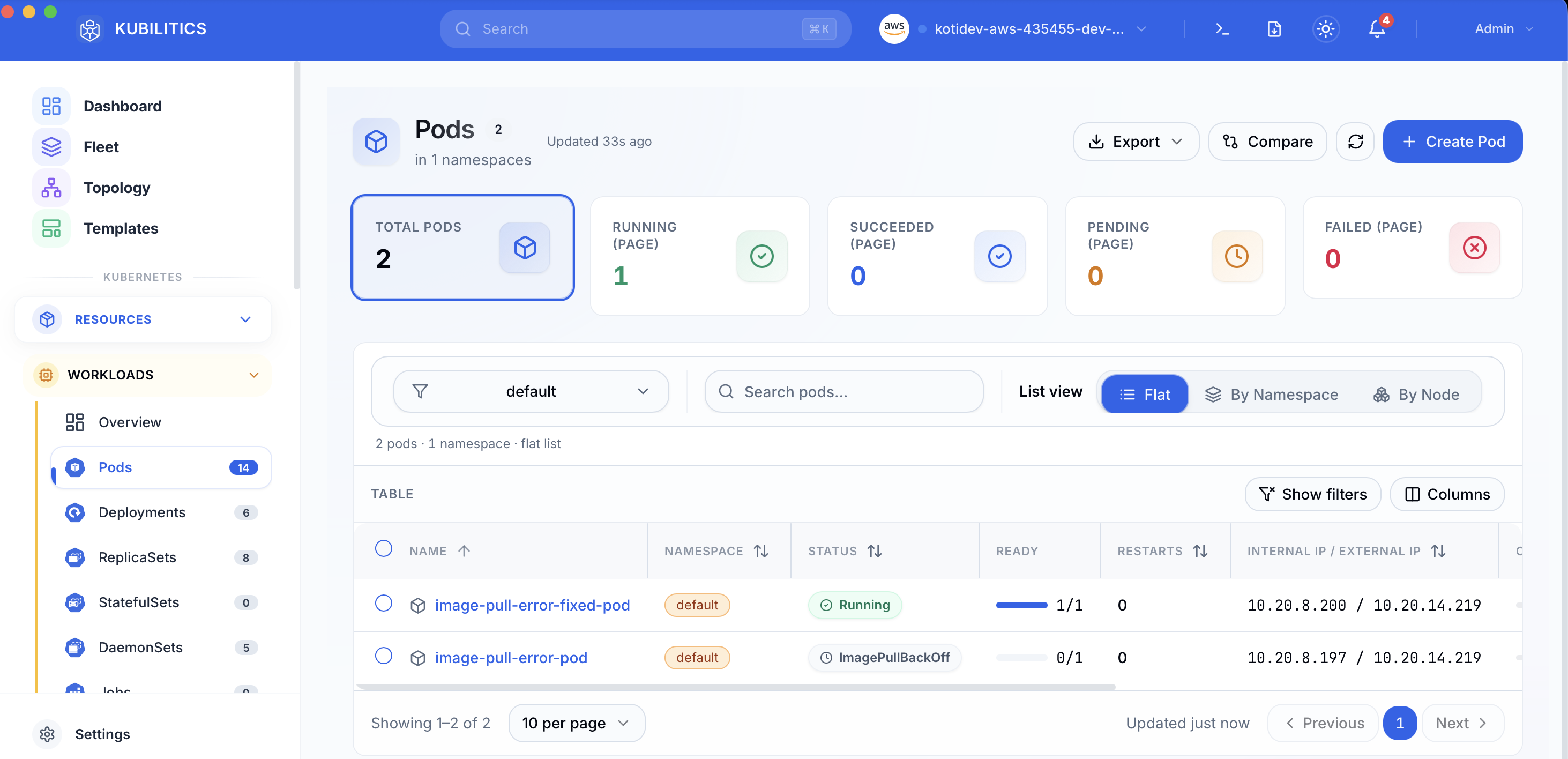
The same debug surfaces without reading event tables. Open the Pods view after applying both manifests and you see the broken and fixed pods side by side, each badged with its own status.
The lesson
ErrImagePullis one status for three different failures. Always read theFailedevent message before you touch the fix.kubectl get events --field-selector involvedObject.name=PODis the fastest path to the real error string. Alias it.- DNS lookup fails before auth ever runs. If you see
no such host, stop thinking about pull secrets entirely.
Day 3 of 35 — tomorrow the error is almost identical, but the kubelet has stopped trying.